
Bulky grouped cables, adapters or a power strip
Best-fit profile: tray or basket
Verify: usable length, width and depth; combined supported weight; mounting fit.
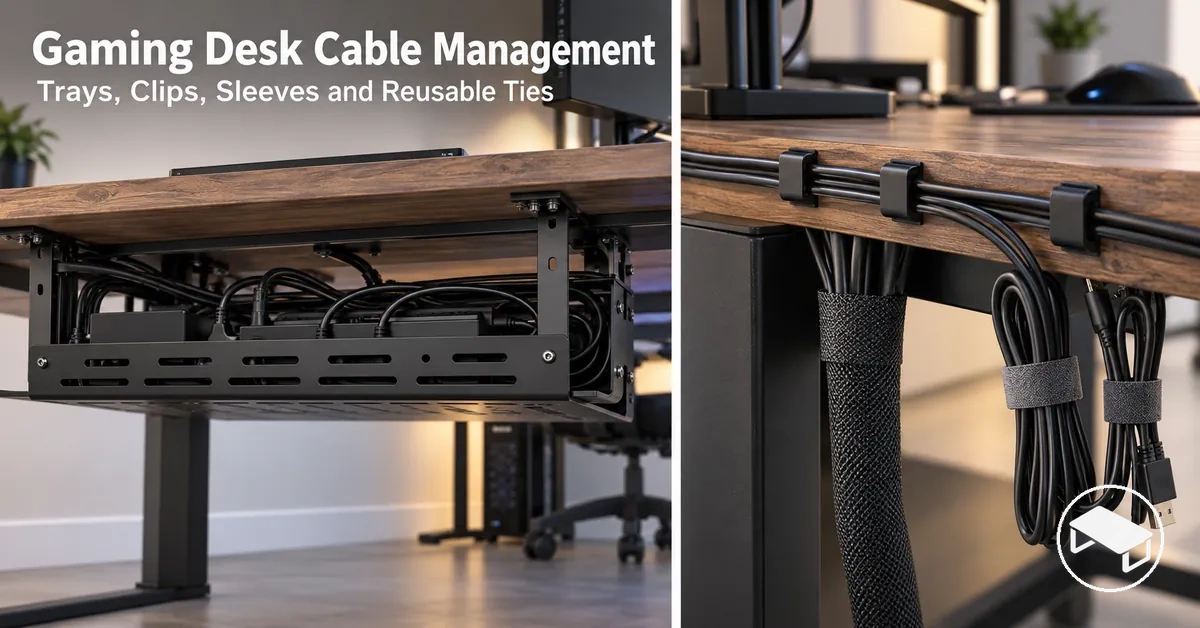
For a gaming desk, choose cable management by cable behaviour and mounting fit: use trays or baskets for bulky grouped runs, a power strip, adapters or power bricks; clips for individual fixed paths; and sleeves or reusable ties for grouped cables. Then verify the organizer’s usable capacity and the desk’s mounting conditions; no single type is best for every setup.
Decision guide
Match the cable condition to the organizer
Start with what the cables need to do, then verify the capacity and mounting conditions that can make or break the fit.
Bulky grouped cables, adapters or a power strip
Best-fit profile: tray or basket
Verify: usable length, width and depth; combined supported weight; mounting fit.
One lead or a small number of leads on a fixed path
Best-fit profile: cable clips
Verify: channel or slot capacity, cable diameter or count, and the mounting surface.
Several cables that should stay enclosed together
Best-fit profile: cable sleeve
Verify: bundle volume, sleeve capacity and how much later access is required.
Grouped cables that are changed or reconnected often
Best-fit profile: reusable ties
Verify: bundle size, reopenability and access to the connections that change.
Decision rule: choose the organizer function first; use product-specific capacity and desk compatibility as the final fit check.
A typical gaming desk can combine monitor, PC or console, power, peripheral, charging, and network leads, with some cables staying fixed while others move or reconnect more often. This page focuses on choosing containment, fixed-path routing, or bundling and then checking capacity and mounting fit; installation procedures and adhesive-failure troubleshooting are separate tasks.
Cable management types differ mainly by function: trays and baskets provide containment for larger cable bundles or a power strip, clips provide routing for individual leads, and sleeves or reusable ties provide bundling for grouped cables.
Each accessory type therefore suits a different cable condition rather than serving as an interchangeable cable organizer.
The comparison below separates these functions by cable pattern and the main fit consideration that affects suitability.

| Accessory type | Primary function | Typical cable or bundle pattern | Main fit consideration |
|---|---|---|---|
| Trays and baskets | Containment | Larger grouped cable bundles, adapters, or a power strip | Available containment space must accommodate the intended cable and adapter volume, while the mounting method must suit the desk condition. |
| Clips | Routing | Individual leads following a fixed path | The cable holder must retain the intended lead size, while its mounting method must suit the supporting desk surface. |
| Sleeves | Bundling | Multiple cables enclosed together along a shared path | The sleeve must accommodate the grouped cable volume while providing the level of cable access required by the setup. |
| Reusable ties | Bundling | Grouped cables that need to remain accessible for changes | The tie must close around the intended bundle and remain reopenable when connections are rearranged. |
Function should drive type choice: containment suits a larger cable bundle or power strip that needs a defined holding area, routing suits individual leads that need a fixed path, and bundling suits cables that need to remain grouped.
Exact fit is product- and setup-specific because cable size and bundle volume determine the space required, while desk conditions determine whether the stated mounting method is suitable.

A bundle containing grouped cables alongside adapters or a power strip concentrates bulk in one place, so an under-desk tray or cable basket provides shared containment rather than controlling each lead separately.
As the cable and device volume increases, the required usable space also increases, while suitability for their combined weight remains limited by the specific product's stated load conditions.
Exact dimensions and load limits should therefore be verified for the selected tray or basket during the later sizing and rated-load evaluation.

For a mouse, keyboard, headset, or similar peripheral lead that needs a controlled route beneath or along the desk, cable clips guide and retain the lead at selected points rather than provide the bulk containment of a tray.
This routing role applies when routing gaming desk cables with trays and clips, while surface preparation, attachment procedures, and adhesive-failure troubleshooting remain outside this selection decision.
Cable sleeve
Prioritises continuous enclosure for cables that travel together. Choose it when the grouped run fits the sleeve and frequent reopening is not the main need.
Reusable ties
Prioritise adjustable, reopenable grouping. Choose them when cables are added, removed or reconnected often.

In a changing setup, adding, disconnecting, or rearranging cables changes the bundle size and how readily individual connections need to remain accessible.
The suitable method therefore depends on the intended bundle size, the desired level of enclosure, and how often the grouped cables need to be accessed or rearranged.
Organizer choice should match the gaming desk setup rather than rely on cable count alone.
Verify cable count, connector bulk, movement, and access frequency before defining the organizer requirement.
For a setup dominated by stationary grouped cables and bulky connectors, these conditions point toward an organizer requirement focused on containment, while frequently moved or reconnected peripheral cables point toward accessible routing or reusable grouping.
Multiple gaming peripherals can increase cable count and connector variety because the resulting device mix can add peripheral leads with different connection types and grouping needs.
Higher cable density
Requires more usable containment or grouping capacity for the actual cables and connectors present.
Greater connector variety
Can require separate paths or grouping by function so bulky connectors do not make one bundle impractical.
Planned future additions
Increase the required capacity only when they add cables or connector bulk; there is no universal cable-count threshold.
Mostly fixed cables
Favour stable routing, retention or containment because access changes are infrequent.
Frequently moved or reconnected cables
Favour easy access and reusable management because the route or connection changes more often.
For a cable that is normally fixed but occasionally disconnected, the organizer still needs enough retention to keep its usual route while allowing practical reopening when the connection changes.
An under-desk tray or cable basket is suitable only when its usable internal dimensions fit the intended cable bundle, adapters, and power bricks and its manufacturer-rated load supports their combined weight.
Spatial capacity
Check the organizer’s usable internal length, width and depth against the cable bundle, connectors, adapters and a power strip, adapters or power bricks that must fit inside it.
Weight capacity
Check the combined supported weight against the specific tray or basket’s manufacturer-rated load. Physical fit alone does not establish load suitability.
Actual usable dimensions and rated load remain product-specific and should be checked against the published specifications for the selected model.
Usable tray dimensions should accommodate the actual cable bundle, power strip, adapters, and connectors within the tray's usable internal space.
For a tray intended to hold several differently shaped items, compare the space they occupy in their intended arrangement with the dimensions the manufacturer identifies as usable internal space:
A power strip may fit along the available length yet still fail the fit check if its width, connector bulk, or attached adapters exceed the available width or depth, so multi-dimensional fit remains the deciding condition.
The combined weight of the supported items in a cable tray or cable basket must remain within the specific product's rated load.
No single load value should be assumed across products; the applicable capacity is the manufacturer-stated rating for the specific tray or basket.
The tray or basket is suitable on this criterion only when the verified combined weight remains within its stated rated load under the manufacturer's specified conditions.
Adhesive organizers and clamp-on organizers both provide no-drill mounting, but their compatibility depends on different desk conditions.
Compare surface condition, desk-edge geometry, removability, and load suitability before choosing either mounting method.
| Mounting method | Desk condition | Load dependence | Removability | Main compatibility constraint |
|---|---|---|---|---|
| Adhesive organizer | The desk surface must meet the adhesive product's stated surface conditions. | Retention must remain within the product's stated load and application conditions. | The organizer can be removed when its specified removal method permits, but the effect on the desk finish depends on the adhesive, surface, and removal conditions. | Adhesive compatibility with the desk surface and the intended supported load. |
| Clamp-on organizer | The desk edge must provide compatible thickness, shape, and clearance for the clamp. | The intended load must remain within the specific clamp-on organizer's stated capacity and mounting conditions. | The clamp can be released for removal or repositioning when the product design permits, but this does not establish that every desk finish will remain unaffected. | Desk-edge geometry and clearance must fall within the clamp's stated fit conditions. |
For a desk with a compatible surface but no suitable exposed edge, an adhesive organizer can meet the no-drill requirement when its stated surface, retention, and load conditions match the setup.
Where the desk edge provides the required geometry and clearance, a clamp-on organizer can provide removable mechanical attachment when the intended load remains within its specified capacity.
Compatibility therefore follows the organizer's published mounting conditions and the actual desk surface or edge, so the appropriate choice remains conditional on the product and desk rather than either method being universally suitable.
If an installed adhesive clip loses retention, causes and corrective steps belong to fixing cable clips that keep falling off rather than this compatibility decision.
Removable mounting is therefore compatible only when the specific desk edge provides the required clamping range, underside clearance, contact area, and rated-load conditions.