
Desk Mat vs Mouse Pad for Gaming: Coverage and Setup Fit
Neither a desk mat nor a mouse pad is universally better for gaming: choose a desk mat when you want shared keyboard-and-mouse coverage, and a mouse pad when you want a dedicated mouse surface. Whichever format you choose, verify usable mouse area, surface consistency, friction, base stability, desk fit and play style rather than relying on the label alone.
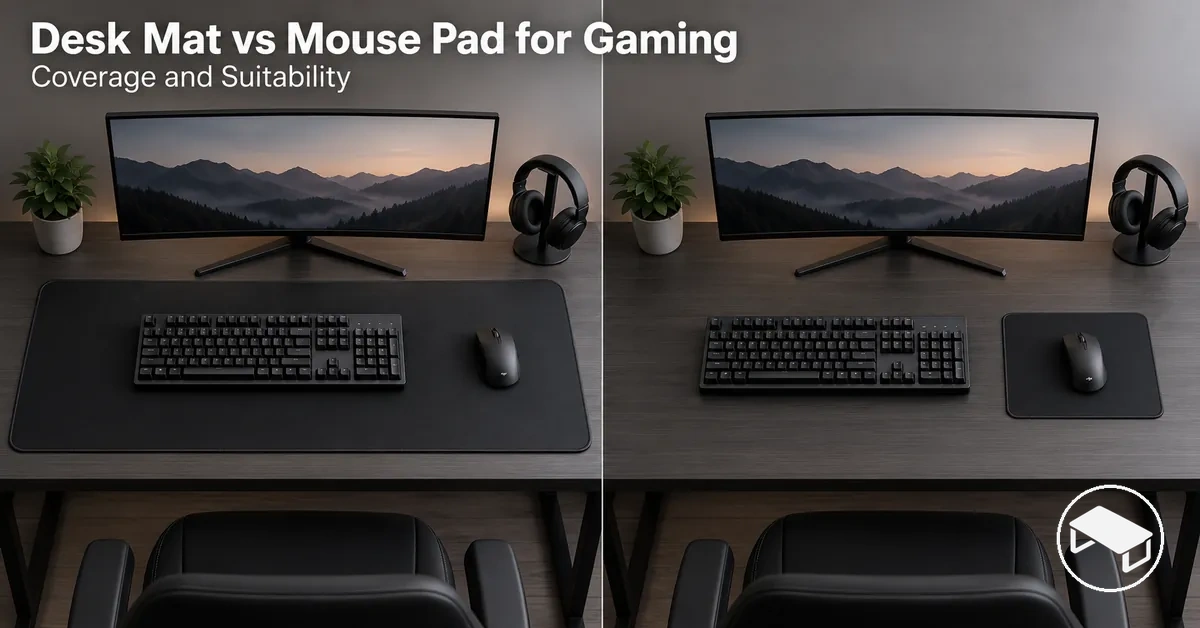
Desk mat vs mouse pad: setup decision guide
Start with the role the surface must perform, then verify physical fit and mouse-control requirements.
Desk mat tends to fit when
- the keyboard and mouse should share one covered surface;
- the desk has enough width and depth for the broader footprint;
- enough unobstructed mouse area remains after the keyboard is positioned.
Mouse pad tends to fit when
- the mouse needs a dedicated surface separate from the keyboard;
- a more compact footprint or easier portability is useful;
- the available pad area accommodates the required mouse travel.
- Surface behaviour
- Compare consistency, friction, glide and stopping control across the area actually used.
- Stability
- Check that the base resists unwanted movement on the particular desk surface.
- Movement area
- Low-sensitivity play usually needs more unobstructed mouse travel, regardless of the format name.
Decision rule: choose by required coverage first; when mouse feel or movement range is decisive, let usable area and actual surface behaviour override the category label.
A desk mat is a larger surface format intended to extend beneath multiple desk items, commonly placing the keyboard and mouse on the same covered area.
A mouse pad is a dedicated mouse area that separates the tracking surface from the keyboard's position on the desk.
Large-format or extended pads can overlap these roles when their surface coverage accommodates both devices, so the format name alone does not determine how the surface will function during play.
Table of Contents
Desk Mats and Mouse Pads Serve Different Surface Roles
A desk mat typically covers a broader part of the desk surface so the keyboard and mouse can share one covered area, while a mouse pad typically provides a dedicated surface for the mouse area and tracking.

Functional role at a glance
Desk mat
Typically provides broader shared coverage beneath the keyboard, mouse and sometimes other desk items.
Mouse pad
Typically reserves a dedicated surface for mouse movement; extended versions can overlap with desk-mat coverage.
Boundary: the label describes a typical role, not guaranteed construction or gaming performance. Treat large-format products as substitutes only when their usable area, surface behaviour and stability meet the same setup requirements.
When a Desk Mat Can Serve as a Gaming Mouse Pad
A desk mat can serve as a gaming mouse pad only when its usable surface and base provide the tracking, control, and stability required by the user's mouse and play style.
The mouse surface should feel consistent across the area used for movement, while the base should remain stable on the desk surface during normal input.
Suitability therefore needs to be verified from these conditions rather than inferred from the desk mat label alone.
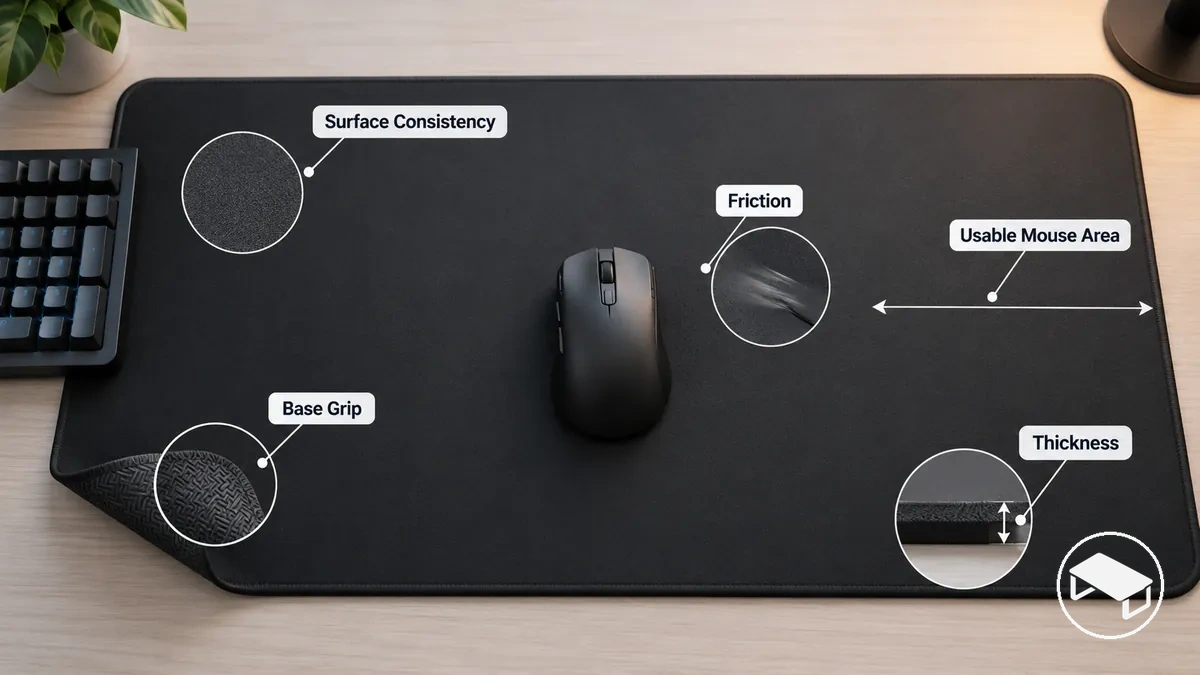
Compatibility checklist
- Surface consistency: mouse movement across the intended area maintains a consistent surface feel for control.
- Friction or glide: movement and stopping feel suit the user's preferred control style.
- Base grip: the desk mat remains sufficiently stable during normal mouse movement.
- Usable mouse area: the available surface accommodates the movement required by the user's play style.
- Thickness: the profile is suitable when it does not create an unwanted change in surface feel or stability.
For example, in a gaming setup where the required mouse movement stays within a consistent usable area and the desk mat remains stable, the mat can fulfil the practical role of a dedicated gaming mouse pad.
If the checklist instead reveals inconsistent surface feel, unwanted base movement, insufficient usable area, or a thickness that disrupts the desired feel or stability, a dedicated mouse surface may be more suitable.
A desk mat is therefore a suitable substitute when these compatibility conditions match the mouse and play style.
Surface Coverage, Size and Keyboard-and-Mouse Fit
The main fit difference between a desk mat and a mouse pad is how much desk space the surface occupies and whether its width and depth must accommodate both the keyboard and mouse.
A broader desk mat can place both devices on one surface, while a mouse-only pad reserves its footprint for usable mouse area and leaves the keyboard on the desk surface.
Size labels do not establish one universal set of dimensions, so physical fit should be judged from the product's stated width and depth and the available desk layout; for context, Vograce's 2026 size guide lists formats ranging from a 250 × 210 mm mouse pad to a 1200 × 550 mm full-desk format.

On a compact desk, a smaller mouse pad can leave more uncovered desk space and edge clearance because the keyboard does not need to share its surface.
A desk mat requires enough width and depth for the portion of the keyboard and mouse setup placed on it, while the keyboard footprint reduces the surface available exclusively for mouse travel.
Conversely, an extended mouse pad or desk mat can provide one broad keyboard-and-mouse zone when its footprint fits the available desk space.
The table compares how surface coverage, dimensions, keyboard placement, usable mouse area, edge clearance, and portability affect physical fit.
| Fit criterion | Desk mat | Mouse pad | Setup consequence |
|---|---|---|---|
| Width and depth | Broader footprint can span the keyboard and mouse area. | More compact footprint can remain dedicated to the mouse. | The stated dimensions must fit the available desk width and depth while leaving practical edge clearance. |
| Keyboard inclusion | Keyboard can share the covered surface with the mouse. | Keyboard can occupy separate desk space. | Shared placement allocates part of the surface footprint to the keyboard rather than mouse movement. |
| Usable mouse area | Available mouse travel is the portion of the surface left usable after the keyboard and other equipment are positioned. | The dedicated surface can allocate its footprint primarily to mouse travel. | The usable area must accommodate the movement required by the user's play style. |
| Desk-edge clearance | A broader footprint consumes more of the available desk surface. | A smaller footprint leaves more surrounding desk surface under the same desk-layout conditions. | Fit requires the selected footprint to remain within the usable desk area without conflicting with surrounding equipment or edges. |
| Portability | A broader format has a larger surface footprint to accommodate when moving between setups. | A compact format has a smaller surface footprint to accommodate when moving between setups. | The smaller footprint can be easier to fit across desks with different available surface areas. |
For a low-sensitivity setup requiring greater mouse travel, the decisive measurement is the usable mouse area remaining after the keyboard and other equipment are positioned, rather than the format name alone.
A broader desk mat can provide that movement area when its overall footprint fits the desk, while a dedicated mouse pad can allocate its surface to mouse movement without also accommodating the keyboard.
Choose the format whose stated width and depth fit the available desk space while leaving sufficient usable mouse area and practical edge clearance for the actual setup.
Mouse Tracking, Control and Gaming Performance
Gaming performance depends more on surface consistency, friction, usable movement area and stability than on whether the surface is labelled a desk mat or mouse pad.
A sufficiently uniform mouse surface can support more consistent mouse tracking, while its friction profile shapes glide and stopping control and a stable base limits unwanted surface movement during input.
The useful comparison is therefore surface consistency, friction, base movement, and usable movement area rather than an assumed performance advantage from either category label.

Tracking consistency describes how predictably the mouse responds across the area being used when the surface condition remains consistent; surface variation can introduce variation in that behaviour.
Glide describes movement feel across the surface, while stopping control concerns how readily the user can halt or correct movement, with both conditioned by the surface's friction characteristics.
Base movement can reduce control consistency when the mat itself shifts on the desk surface, while usable movement area determines whether the required mouse travel fits within the available zone before repositioning is necessary.
These criteria allow desk mats and mouse pads to be compared by observable surface behaviour rather than by category name.
| Surface factor | Desk mat | Mouse pad | Likely control effect |
|---|---|---|---|
| Surface consistency | Adequate when the mouse zone maintains a sufficiently uniform surface condition. | Adequate when the dedicated mouse surface maintains a sufficiently uniform surface condition. | More uniform behaviour across the used zone can support greater tracking consistency. |
| Friction and glide | A consistent friction profile across the mouse zone can provide predictable movement feel. | A mouse-focused surface can provide predictable movement feel when its construction produces a consistent friction profile. | Consistent friction can make glide behaviour more predictable for the user's control style. |
| Stopping control | Suitable when the surface provides the resistance needed for the user's stopping and correction style. | Suitable when the dedicated surface's friction characteristics match the user's stopping and correction style. | A suitable friction profile can make stopping behaviour more predictable for that setup. |
| Base movement | A stable base limits unwanted movement of the shared surface during mouse input. | A stable base limits unwanted movement of the dedicated surface during mouse input. | Limiting surface movement removes one source of physical variation during mouse control. |
| Usable movement area | Adequate when the unobstructed mouse zone accommodates the movement required by the user's play style. | Adequate when the dedicated surface accommodates the movement required by the user's play style. | Sufficient usable movement area allows the intended mouse travel before repositioning becomes necessary. |
For general gaming, a desk mat can be sufficient when its mouse zone provides consistent surface behaviour, suitable friction, stable desk contact, and enough usable movement area for the player's play style.
For a mouse-performance-first setup, a dedicated gaming mouse pad can be the better fit when its actual construction provides a more predictable glide and stopping response for the user's control preference.
Choose between the formats according to observed surface behaviour and the gaming setup's control requirements rather than assuming that either label guarantees greater precision or gaming performance.
Comfort and Stability During Gaming
Comfort and stability vary with contact area, cushioning, thickness, and base grip rather than with the desk mat or mouse pad format alone.
A surface covering more user-contact area can create a more continuous contact feel, while cushioning and thickness determine whether that contact feels firmer or more padded; base grip influences resistance to unwanted surface movement on the desk.
These factors describe perceived comfort and practical stability, not medical or ergonomic outcomes.
What changes the feel
- Shared contact area
- A desk mat can place the keyboard and mouse on one padded surface for a more continuous contact feel.
- Separate contact areas
- A mouse pad keeps its cushioning and thickness independent from the keyboard's contact with the desk.
- Base grip
- Grip that suits the desk surface limits unwanted mat or pad movement and improves practical stability.
- Edge feel
- The edge matters mainly where the hand or forearm meets it; its effect changes with contact position and profile.
Prefer the format whose cushioning, thickness, edge feel, and resistance to surface movement match the user's contact position and setup preference rather than assuming that a larger or softer surface is inherently more comfortable.
Durability and Long-Term Wear
The useful life of a desk mat or mouse pad depends on its construction and use conditions rather than on a fixed lifespan for either format.
A larger shared surface can experience wear across areas contacted by the keyboard, mouse, hands, and other desk items, while a dedicated mouse pad concentrates repeated use within its mouse area.
Because construction and use intensity vary between products and setups, durability is better judged from observable surface wear, edge condition, compression, and base grip than from the desk-mat or mouse-pad label.
For long-term use, monitor the product's condition and follow its applicable care guidance rather than relying on a fixed replacement interval.
Cost and Value Trade-Offs
Value depends on what the desk mat or mouse pad needs to cover and do for the gaming setup, not on cost alone.
A higher purchase cost can represent better relative value when it provides useful coverage or functions the setup actually requires, while paying for unused coverage or function adds less practical value.
Because current prices vary by individual product and seller, compare the actual purchase cost against coverage, gaming suitability, durability expectation, and functional breadth rather than assuming a fixed price difference between the two formats.
Purchase cost is the amount paid for the surface, while value reflects how much of the purchased coverage and function is useful for the intended setup.
A desk mat can provide broader shared coverage for the keyboard and mouse, whereas a mouse pad can concentrate its function on a dedicated mouse area when additional desk coverage is unnecessary.
Durability expectation also changes relative value because a surface that reaches a replacement condition sooner under the intended use provides a different useful-life outcome for its cost.
The table organizes the cost-value trade-offs across coverage, gaming suitability, expected wear, and functional breadth.
| Value factor | Desk mat | Mouse pad | Relative value condition |
|---|---|---|---|
| Purchase cost | Compare the actual price with the useful shared surface and functions provided. | Compare the actual price with the useful dedicated mouse surface and functions provided. | The stronger value is the option whose useful functions justify its cost for the setup. |
| Coverage | Provides broader shared coverage when both keyboard and mouse need the surface. | Provides focused coverage when only a dedicated mouse area is required. | Coverage contributes to value only when the setup makes practical use of that area. |
| Gaming suitability | Contributes value when the usable mouse area and surface behaviour suit the intended gaming use. | Contributes value when the dedicated surface behaviour suits the intended gaming use. | Suitability strengthens value when the surface meets the user's actual gaming requirements. |
| Durability expectation | Expected wear affects value according to how the shared surface holds up under the intended use condition. | Expected wear affects value according to how the dedicated area holds up under the intended use condition. | A replacement condition reached sooner reduces the useful service obtained for the purchase cost. |
| Functional breadth | Can combine mouse use with shared keyboard-and-desk coverage. | Can concentrate its function on a dedicated mouse area. | Additional functions strengthen relative value only when they are useful to the setup. |
A desk mat can offer stronger value when broader shared coverage is genuinely required; the extra area contributes value only when keyboard-and-mouse coverage is part of the setup.
A mouse pad can offer stronger value when only a dedicated mouse surface is required, because broader keyboard or desk coverage would add little practical benefit.
The better-value choice is the format whose useful coverage, gaming suitability, durability expectation and functional breadth most closely justify its actual cost for the setup.
Desk Mat or Mouse Pad by Gaming Setup
The better format depends on the gaming setup's desk space, desired coverage, mouse movement needs, keyboard placement, and surface-performance priority rather than on the desk mat or mouse pad label alone.
A desk mat tends to fit setups that benefit from one shared surface beneath the keyboard and mouse, while a mouse pad tends to fit setups that need a dedicated mouse surface without broader desk coverage.
Budget sensitivity should then be weighed against the functions the setup will actually use, so these setup criteria determine which format is the stronger fit.
Setup decision signals
- Desk space: space that accommodates a shared keyboard-and-mouse surface tends to favour a desk mat; space reserved mainly for a dedicated mouse area tends to favour a mouse pad.
- Coverage: a need to cover both keyboard and mouse areas tends to favour a desk mat; a need to cover only the mouse area tends to favour a mouse pad.
- Mouse movement: favour the format whose unobstructed usable area accommodates the movement required by the user's play style.
- Keyboard placement: placing the keyboard on the same surface tends to favour a desk mat; keeping the keyboard separate from the mouse surface tends to favour a mouse pad.
- Surface-performance priority: when movement feel and control characteristics take priority, favour whichever format provides the required surface behaviour rather than selecting by format alone.
- Budget sensitivity: favour the format whose cost is justified by the coverage and functions the gaming setup will actually use rather than paying for unnecessary surface area or choosing on price alone.
A desk mat tends to suit a gaming setup that benefits from broader shared coverage and keyboard-and-mouse placement on one surface, while a mouse pad tends to suit a setup that prioritizes a dedicated mouse surface or has little need for additional coverage.
When mouse movement or surface-performance priority is decisive, the usable area and actual surface behaviour should determine the format instead.
The practical choice is the desk mat or mouse pad that satisfies the required desk space, coverage, keyboard placement, mouse movement, surface-performance priority, and budget sensitivity without adding unnecessary functions.
The products below are examples of the two surface types; use the decision criteria above before following a product link.
Before buying, check the listed dimensions, surface material, backing, edge construction and product details against your setup.

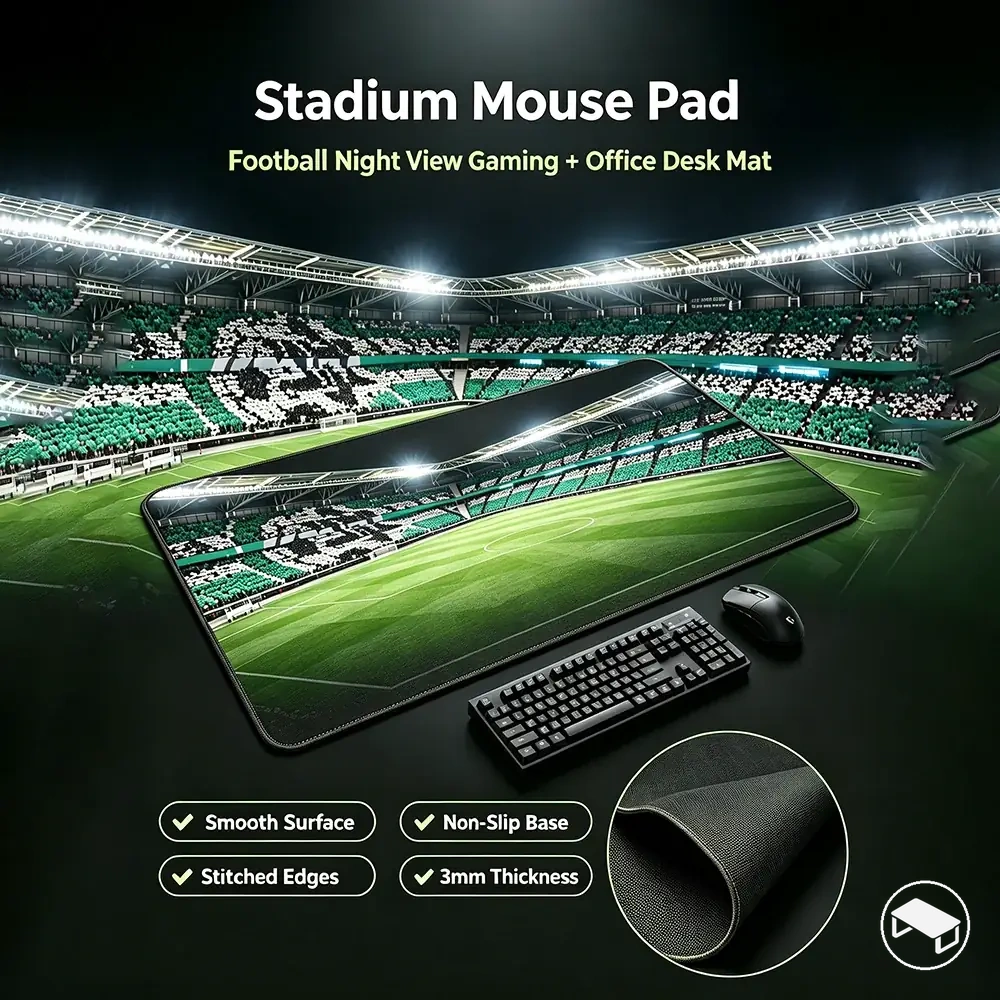
Desk Mats for Wider Keyboard-and-Mouse Coverage
A desk mat is the stronger local fit when the gaming setup benefits from one continuous keyboard-and-mouse surface and the mouse area remains suitable for gaming.
Good fit when
- the keyboard and mouse fit the intended covered area within the available desk footprint;
- the mouse still has enough usable travel after the keyboard is positioned;
- surface consistency remains suitable across the movement zone;
- the base stays stable during normal keyboard and mouse use.
Wider coverage therefore favours a desk mat only when its usable mouse area, surface consistency, and base stability also meet the gaming setup's requirements.
Mouse Pads for Dedicated Mouse Performance
A mouse pad is the stronger local fit when the gaming setup prioritizes a dedicated and predictable mouse surface without requiring coverage beneath the keyboard.
Good fit when
- the dedicated area accommodates the mouse travel required by the user's play style;
- the surface provides the desired glide and stopping control across that area;
- keeping the keyboard separate from the mouse surface suits the layout;
- a compact footprint or portability is useful without sacrificing required mouse area.
A mouse pad therefore fits this setup when dedicated use, keyboard separation, portability, or budget focus aligns with the required mouse area and surface behaviour, without implying that the format is preferable for every gaming setup.